The thing won't START, Part 2
(…continued from Part 1)
In some ways, I think keeping this journal was one of the better decisions on this project. Never was one for talking to a rubber duck, but somehow putting thoughts to words gives me a better view of the overall picture, and keeping a record of all the stuff I did doesn’t hurt either; I already found myself going back to old posts to remind myself of how or why I used to do something in the past. But the best part has to be that writing brings out new ideas whenever I’m stuck. So it was this time. No sooner than ink had dried on my previous post, I already had a bunch of new ideas on how to proceed, and by New Year’s Day I had the recreation running.
There have been a bunch of pretty surprising coincidences involved in this bug that made it act wacky, so read below on how I managed to track it down and resolve it.
Introspection
The problem I was having with the freezing executable is that the log output was confusing. Sometimes it would appear to be trimmed. Sometimes there was more of it, sometimes just a little. The code seemed to be working slowly, but delta measurements showed little to no delay between the lines. In essence, trying to look at the game’s behaviour through the logs just caused more confusion, leading me to question my logging framework.
Then I realized that the confusion could be eliminated if I wasn’t looking at the output through the logfile after the fact, but directly on the terminal as it was happening. Then I could visually see how long stuff was taking. Of course, the game switches to graphical mode which screws up the text display, but I have the source code now, so I can just comment it out temporarily. So that’s what I ended up doing.
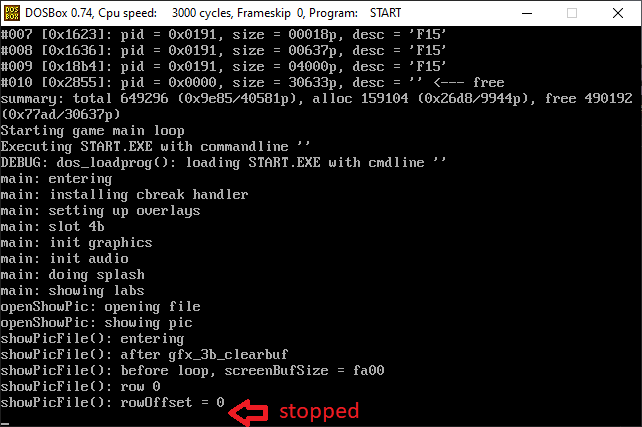
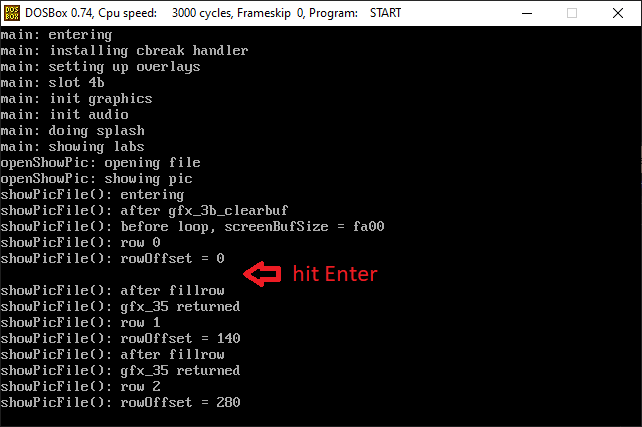
Seeing the game that was a black box up until recently now spill its guts all over the console is pretty neat, I think. In any case, as seen from the first screen, the game pauses immediately after entering the decoding loop for row zero, and it appears to be waiting for input! When I pressed the Enter key, you can see it progressed up to row 2, before stopping on input again. What is going on here?
Why is it waiting for keyboard?
I figured since it is trying to get input from the console, it probably must be invoking interrupt 16 at some point, so I placed an interrupt breakpoint with bpint 16 in Dosbox. Sure enough, it fired:
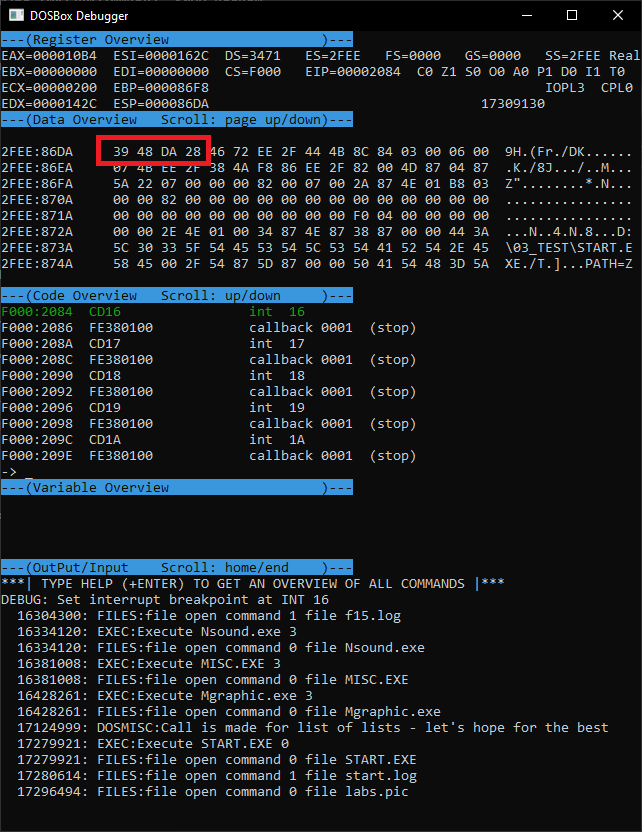
Looking at the contents of the stack in the data overview pane, I can see the address of the segment where I know the executable was loaded (0x28DA), along with the offset 0x4839. That is the function which invoked the interrupt. By pointing the code overview to that address, and searching for the instructions in my assembly file, I soon had my culprit:
read512FromFileIntoBuf proc near
    push ds
    mov ah, 3Fh
    mov bx, seg startData
    mov ds, bx
    mov bx, _tmpFileHandle ; device/file handle to use is passes in a global variable
    mov cx, 200h ;read 512 bytes at most (int 21 returns number of chars)
    mov dx, offset _fileReadBuf
    int 21h ;DOS - 2+ - READ FROM FILE WITH HANDLE
    jnb short readSuccess
    mov dx, offset _aReadError ;"Read error$"
    mov cx, 0FFFFh
    jmp short errorAndExit
    nop
readSuccess:
    pop ds
    retn
read512FromFileIntoBuf endp
It does not appear to be calling int 16 directly, but it does try to read from a file. I placed a breakpoint on this routine, and sure enough, the value that it uses for the file handle is zero, meaning it’s reading from stdin - mystery solved. Presumably, the int 21 handler invokes the keyboard interrupt when it sees that the device to act upon is the standard input.
Ok, but why isn’t it reading the PIC file?
This routine is used by showPicFile which I was instrumenting with logs before, albeit indirectly; it sets a pointer to the read routine along with the destination buffer and the file handle, then some other routine invokes read512FromFileIntoBuf through the pointer:
_showPicFile proc near
    handle = word ptr 4
    pageNum = word ptr 6
    push bp
    mov bp, sp
    push di
    push si
    push es
    push bp
    trace msg1,bp+4,bp+6
    mov ax, offset read512FromFileIntoBuf
    mov _readFromFilePtr, ax
    mov ax, [bp+handle]
    mov _tmpFileHandle, ax
    ; ...
I placed a break at the location and I could see that the value of the file handle was 7. Yet when read512... is invoked, it reads the handle value as zero. I pointed the memory view window to the address and sure enough, it was zero in memory. Is somebody changing the value between its setting in showPicFile and its usage in read512...? I used a memory breakpoint (bpm ds:16ba) in the dosbox debugger, but no, the value did not change. So how come it’s 7 here and 0 over there? Then I noticed it. The data segment address was different.
Problem between chair and keyboard
It was caused by the following lines in read512...:
    mov bx, seg startData
    mov ds, bx
The routine is resetting the data segment, but it’s not the right data segment. At the top of this assembly file, I have what I though was a forward declaration for the data and BSS segments:
DOSSEG
.8086
.MODEL SMALL

startData segment word public 'DATA'
startData ends
startBss segment byte public "BSS"
startBss ends

DGROUP GROUP startData,startBss
ASSUME DS:DGROUP
However, in the autogenerated assembly file that contains all the actual data, I switched over to the simplified/standard MASM segment declarations with .DATA/.DATA? and forgot about it. There is no such thing as startData, it’s just an empty segment that the assembler created, and it just happened to contain zeros at runtime, which got into the file handle, redirecting the read from the file to the standard input.
It all comes together
The seemingly irrational behaviour of the bug was because I was logging to a file, and staring at a black screen in the emulator. Sometimes I was pressing keys which made the row processing routine advance further, sometimes not. There is also a bug in vanilla DosBox where if the emulator window gains focus, it will sometimes start sending bogus keyboard input into the window until you hit a key. That must have kicked in the time I saw the routine advance past row 70 in the logs. Also, the keys were coming in pretty fast, so there was never a time difference of more than 1 second. My time delta calculation was correct, when I was looking at it on the console and waiting a couple seconds between the keypresses, the printed delays were accurate.
Whew. That one was pretty wild. Time to fix it.
Will it START?
I removed the unneeded segment declaration from the assembly file, and replaced any references to startData with @data, which is the automatic MASM equate for the data segment. Switched the logging routine to print to a file again, and restored the switch to graphical mode back the way it was. Then I fired it up.
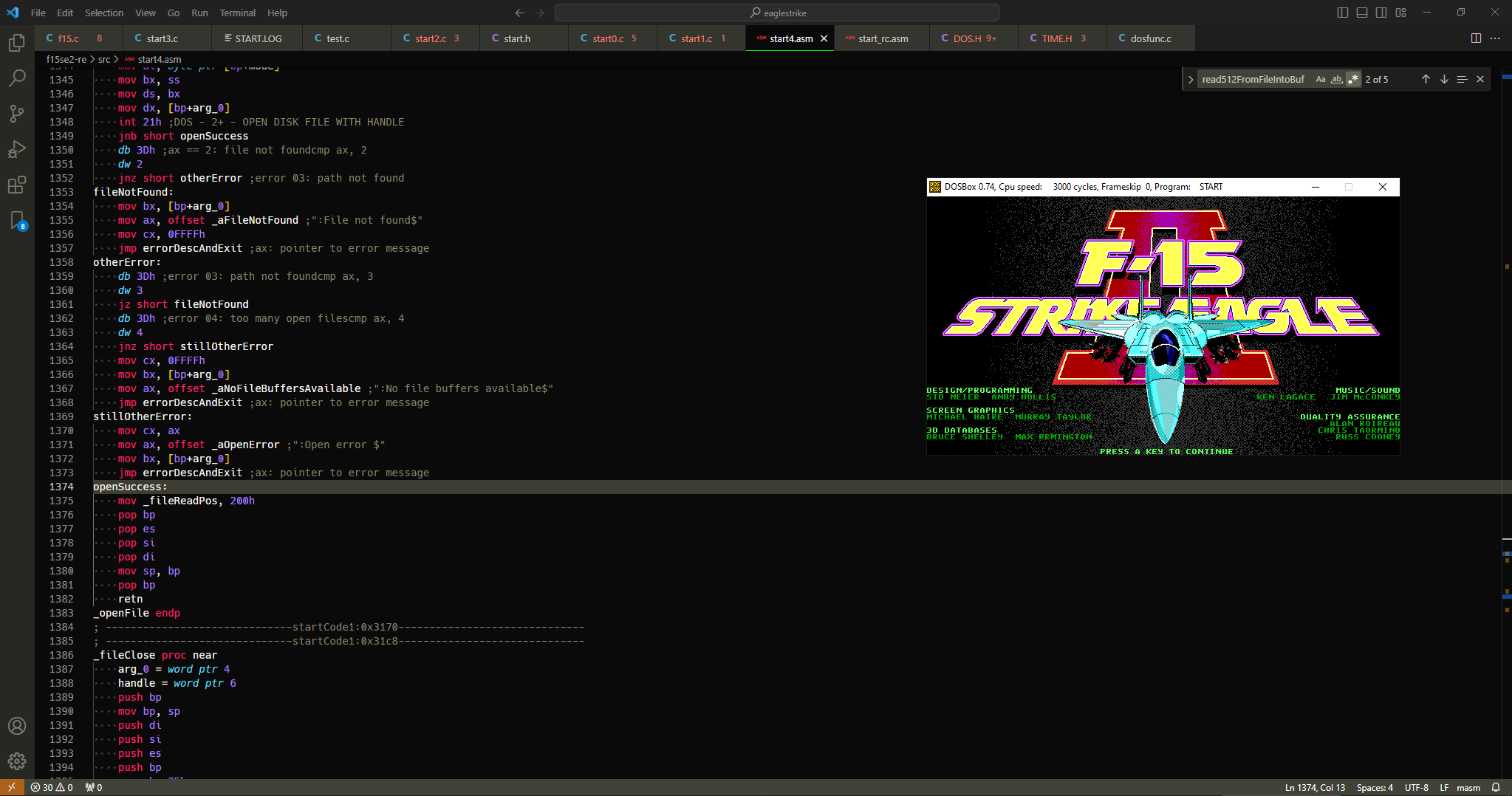
I swear, I’ve never been so happy to see the game title screen before. It does not matter that it crashed upon reaching the pilot selection screen. For it to display the splash screen, a bunch of important things must be going right:
- The overlay drivers are being set up correctly
- The executable is healthy, able to call into C code, assembly code and the overlays plus return without issue
- The different layout of the data segment is not preventing the game from working, meaning (most of) the data references were resolved correctly
Better still, this validates my methodology with using mzdiff to compare the code while reconstructing it, proving that the approach is viable. Sometimes when I’m looking at the diagram in the tools’ README, it makes me think it’s too convoluted and ridiculous, but that’s just what it takes to dissect and put the game back together. Without the tooling, none of this would have been any simpler – all the arrows would just be going to the person shape, and I would have to do all of this stuff manually anyway.
I must say I am pretty happy with my New Year’s present. Looking forward to getting the first part of the game fully running soon.